 +1987 123456
 info@domain.com
 Rock Street, San Francisco

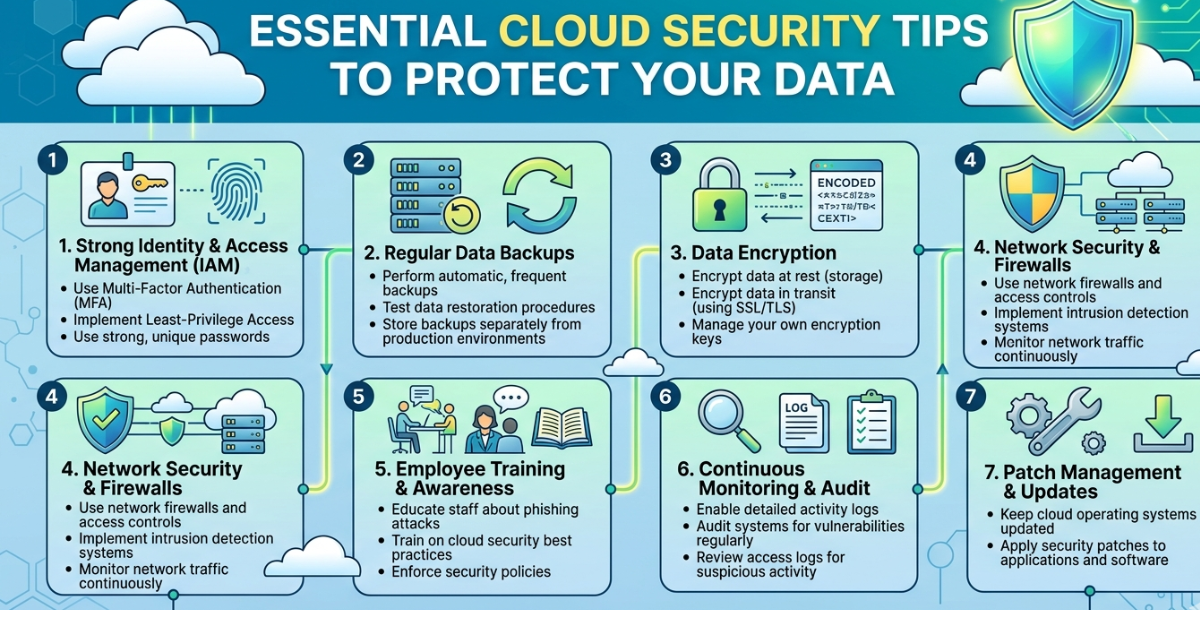
Cloud computing has changed the way businesses store and manage data. From startups to global enterprises, organizations rely on cloud platforms for flexibility, scalability, and cost savings. But with this convenience comes a serious responsibility—keeping your data safe.
That’s where cloud security tips become crucial. Whether you’re using AWS, Google Cloud, Microsoft Azure, or another provider, understanding how to protect your cloud environment can prevent costly breaches and data loss. In this guide, we’ll explore practical and easy-to-implement cloud security strategies that help secure sensitive data and maintain trust.
Why Cloud Security Matters
Before diving into the best cloud security tips, it’s important to understand the risks. Cloud environments are constantly targeted by cybercriminals looking for misconfigured servers, weak credentials, or exposed data.
Some of the most common cloud security threats include:
-
Data breaches
-
Account hijacking
-
Misconfigured storage buckets
-
Malware injection
-
Insider threats
A strong cloud security strategy protects your infrastructure, ensures compliance, and safeguards customer trust.
Practical Cloud Security Tips
1. Use Strong Identity and Access Management IAM
One of the most important cloud security tips is controlling who can access your resources.
Best practices include:
-
Grant access based on roles (Role-Based Access Control)
-
Follow the principle of least privilege
-
Regularly review user permissions
-
Disable unused accounts
IAM tools offered by cloud providers help restrict access to only what users truly need.
2. Enable Multi-Factor Authentication MFA
Passwords alone are not enough. Adding multi-factor authentication significantly improves cloud security.
MFA requires users to verify identity using:
-
A password
-
A mobile authentication app
-
A hardware security key
Even if attackers steal credentials, MFA makes unauthorized access much harder.
3. Encrypt Data at Rest and in Transit
Encryption protects data from being read even if attackers gain access.
Key encryption practices include:
-
Encrypt data stored in databases and storage buckets
-
Use HTTPS/TLS for data transmission
-
Manage encryption keys securely
Most cloud providers offer built-in encryption tools that simplify this process.
4. Regularly Monitor and Audit Activity
Monitoring cloud activity helps detect suspicious behavior early.
Use tools such as:
-
AWS CloudTrail
-
Azure Monitor
-
Google Cloud Logging
These services track logins, system changes, and unusual activity.
5. Keep Software and Systems Updated
Outdated software often contains security vulnerabilities.
Always:
-
Apply security patches promptly
-
Update operating systems
-
Upgrade cloud services when new versions are released
Automation tools can make updates easier to manage.
6. Secure Your APIs
Cloud applications rely heavily on APIs. If they are not properly secured, attackers can exploit them.
To secure APIs:
-
Use strong authentication
-
Implement rate limiting
-
Validate all inputs
-
Monitor API activity
7. Avoid Cloud Misconfigurations
Misconfigured cloud storage is one of the biggest causes of data breaches.
Common mistakes include:
-
Publicly exposed storage buckets
-
Open databases
-
Excessive permissions
Regular configuration audits can prevent these issues.
8. Implement Network Security Controls
Use network security tools to restrict traffic.
Examples include:
-
Virtual Private Clouds (VPCs)
-
Firewalls
-
Security groups
-
Network segmentation
These measures reduce the attack surface of your cloud infrastructure.
9. Backup Data Regularly
Data loss can occur due to cyberattacks, system failures, or human error.
A reliable backup strategy should include:
-
Automated backups
-
Multiple backup locations
-
Regular recovery testing
10. Use Cloud Security Posture Management CSPM
CSPM tools help detect misconfigurations and compliance risks in cloud environments.
They automatically scan for:
-
Security gaps
-
Policy violations
-
Vulnerabilities
Popular CSPM tools include Prisma Cloud and Wiz.
11. Protect Endpoints
Devices accessing the cloud must also be secure.
Ensure endpoints have:
-
Antivirus software
-
Device encryption
-
Secure network connections
Unsecured devices can become entry points for attackers.
12. Train Employees on Security Awareness
Human error remains one of the biggest cybersecurity risks.
Provide training on:
-
Phishing detection
-
Password hygiene
-
Secure file sharing
-
Safe cloud usage
A well-trained team significantly improves overall security.
13. Implement Zero Trust Security
The Zero Trust model assumes no user or device is automatically trusted.
Key principles include:
-
Continuous authentication
-
Device verification
-
Strict access control
Zero Trust is becoming a standard approach for modern cloud environments.
14. Monitor Third-Party Integrations
Many cloud platforms integrate with third-party apps.
Before connecting external services:
-
Verify vendor security standards
-
Limit permissions
-
Monitor integration activity
Third-party apps can introduce hidden vulnerabilities.
15. Develop an Incident Response Plan
Even with strong security, incidents can still occur.
An effective incident response plan should include:
-
Detection procedures
-
Communication protocols
-
Data recovery steps
-
Post-incident analysis
Preparation allows organizations to respond quickly and reduce damage.
Common Cloud Security Best Practices
In addition to the tips above, consider adopting these broader practices:
-
Use security automation tools
-
Implement compliance frameworks (SOC 2, ISO 27001)
-
Perform regular penetration testing
-
Maintain detailed security documentation
These strategies help maintain long-term cloud security.
FAQs About Cloud Security Tips
What is cloud security?
Cloud security refers to the policies, technologies, and practices used to protect cloud infrastructure, applications, and data from cyber threats.
What are the biggest cloud security risks?
The most common risks include:
-
Data breaches
-
Misconfigured cloud storage
-
Weak authentication
-
Insider threats
-
API vulnerabilities
How can small businesses improve cloud security?
Small businesses can strengthen cloud security by:
-
Using multi-factor authentication
-
Encrypting sensitive data
-
Restricting user permissions
-
Regularly backing up data
-
Monitoring account activity
Is cloud storage safer than local storage?
Cloud storage can be safer when properly configured. Major cloud providers invest heavily in security infrastructure, but users must still follow strong security practices.
What is the shared responsibility model?
The shared responsibility model means that cloud providers secure the infrastructure, while customers are responsible for securing their data, applications, and access controls.
CONCLUSIONS
As organizations continue to migrate data and applications to the cloud, security must remain a top priority. Following these cloud security tips—such as enabling multi-factor authentication, encrypting data, monitoring activity, and avoiding misconfigurations—can dramatically reduce the risk of cyberattacks.
Cloud platforms offer powerful tools for protecting digital assets, but they must be used correctly. By implementing strong security practices and staying proactive, businesses can enjoy the benefits of cloud computing without compromising safety.
If you’re building a cloud strategy, start by reviewing your current security setup and gradually applying these best practices. A small improvement today can prevent a major breach tomorrow.

Leave a Reply