 +1987 123456
 info@domain.com
 Rock Street, San Francisco

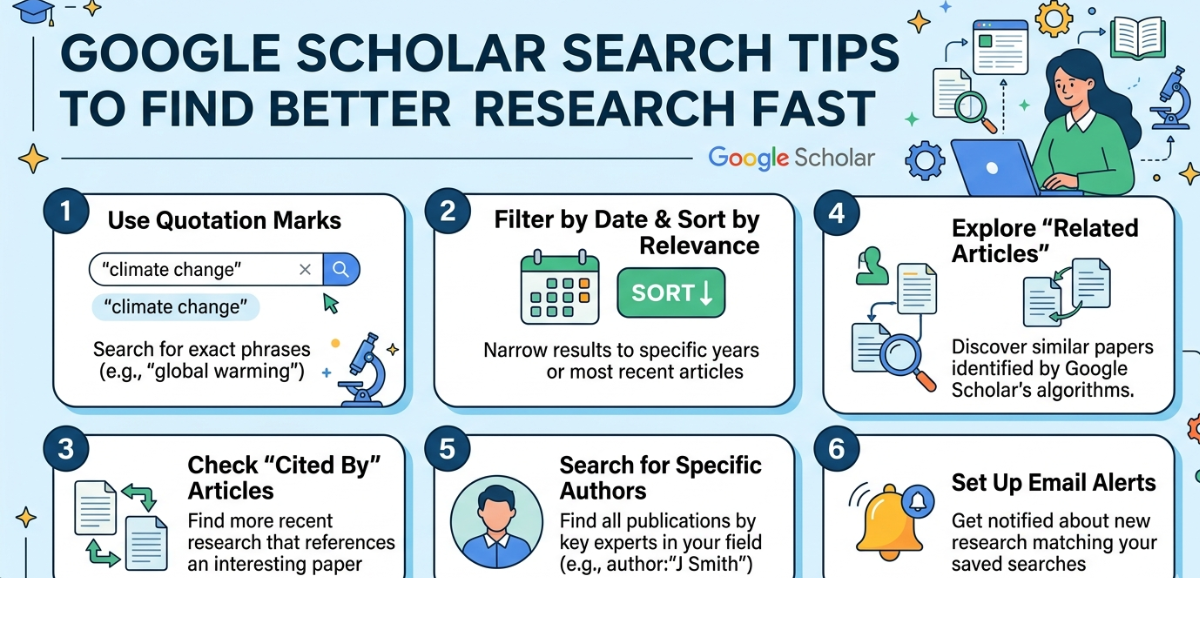
If you’ve ever searched for academic papers online, chances are you’ve used Google Scholar. It’s one of the most powerful tools for finding scholarly articles, theses, books, and conference papers. But simply typing a few words into the search bar doesn’t always give you the best results.
That’s where Google Scholar search tips come in. By using a few smart techniques—like advanced search operators, filters, and citation tracking—you can dramatically improve the quality and relevance of the research you find. Whether you’re a student, researcher, or writer, learning how to search smarter can save hours of time and uncover sources you might otherwise miss.
In this guide, we’ll walk through the most effective strategies to help you master Google Scholar and get the most out of your academic searches.
Why Google Scholar Is Important for Research
Before diving into specific Google Scholar search tips, it helps to understand why this tool is so widely used.
Google Scholar indexes scholarly literature across many disciplines and sources, including:
-
Peer-reviewed journals
-
Academic books
-
Conference papers
-
Theses and dissertations
-
University repositories
-
Professional societies
Unlike regular Google search, Google Scholar focuses on academic credibility, making it ideal for research papers, essays, and scholarly writing.
Essential Google Scholar Search Tips
1. Use Quotation Marks for Exact Phrases
One of the simplest yet most effective Google Scholar search tips is using quotation marks.
When you search for a phrase in quotes, Google Scholar looks for that exact phrase rather than individual words scattered across different sections.
Example:
This ensures the results specifically discuss that phrase rather than loosely related topics.
When to Use This Tip
Use quotes when searching for:
-
Specific theories
-
Research titles
-
Well-known phrases
-
Technical terms
2. Use the Author Search Feature
If you’re looking for research by a specific scholar, use the author search operator.
Example:
This shows papers written by that particular author.
Why It Helps
This technique helps you:
-
Find influential researchers in a field
-
Explore an author’s full publication list
-
Track academic contributions
It’s especially useful when reviewing literature for a research paper.
3. Use the “Cited By” Feature to Find Influential Papers
One of the most powerful features in Google Scholar is the “Cited by” link beneath each article.
Clicking it shows every paper that has cited the original research.
Why This Matters
This technique helps you:
-
Discover newer research built on older studies
-
Identify highly influential papers
-
Explore the evolution of a research topic
For literature reviews, this is one of the best Google Scholar search tips you can use.
4. Filter Results by Year
Research fields evolve quickly. That’s why filtering by date is extremely helpful.
You can limit results to:
-
Since 2024
-
Since 2020
-
Custom date range
When to Use Date Filters
This is useful when:
-
Researching recent scientific discoveries
-
Looking for current statistics
-
Writing papers requiring recent citations
5. Use the Minus Sign to Exclude Words
Sometimes search results include topics you don’t want.
You can remove them using the minus sign.
Example:
This removes results related to COVID-19.
Benefits
This small trick can dramatically improve search precision and reduce irrelevant results.
6. Use the “Related Articles” Feature
Another helpful option in Google Scholar is “Related articles.”
This tool finds papers that share similar themes or references.
Why It’s Useful
It helps you:
-
Expand your literature search
-
Discover similar research quickly
-
Explore connected academic discussions
For researchers, this is one of the most overlooked Google Scholar search tips.
7. Use Advanced Search for Precision
Google Scholar also offers an Advanced Search feature.
You can access it from the menu and refine results by:
-
Author
-
Publication
-
Date
-
Exact phrase
-
Words in title
Example Search
You can search for:
-
Articles containing specific phrases
-
Papers by a certain author
-
Research published in a particular journal
This is especially helpful when conducting systematic research.
Additional Google Scholar Tips for Better Research
Use the Library Access Feature
Many results include links to free PDFs on the right side.
But if your university library is linked to Google Scholar, you can also access subscription-based articles.
How to Enable It
Go to:
Settings → Library Links
Then select your university or institution.
Create Alerts for New Research
Google Scholar allows you to create alerts for specific keywords.
Example
You can track new research on:
-
Artificial intelligence ethics
-
Renewable energy technology
-
Behavioral economics
You’ll receive email updates whenever new papers appear.
Export Citations Easily
Google Scholar makes citation management easy.
Under each article, click the quotation mark icon to export citations in formats like:
-
APA
-
MLA
-
Chicago
-
BibTeX
This saves time when writing research papers.
Common Mistakes to Avoid When Using Google Scholar
Even experienced users sometimes make these mistakes:
-
Searching with overly broad keywords
-
Ignoring citation counts
-
Not using filters
-
Missing advanced search options
-
Failing to check publication credibility
Using the right Google Scholar search tips can help avoid these issues and improve research quality.
FAQs
What is Google Scholar used for?
Google Scholar is a free search engine that indexes scholarly literature such as academic papers, books, theses, and conference publications.
Is Google Scholar better than Google for research?
Yes, for academic work. Google Scholar focuses on peer-reviewed and scholarly sources, making it more reliable for research papers and academic writing.
How do I find free papers on Google Scholar?
Look for PDF links on the right side of search results or search for articles published in open-access journals.
How can I narrow my Google Scholar search results?
You can narrow results by:
-
Using quotation marks
-
Adding filters by year
-
Excluding words with the minus sign
-
Using advanced search options
How do I know if a paper is credible?
Check:
-
Citation count
-
Journal reputation
-
Author credentials
-
Publication year
Highly cited papers often indicate influential research.
Conclusion
Mastering a few simple Google Scholar search tips can completely transform the way you conduct academic research. Instead of scrolling through endless results, you can quickly find the most relevant, credible, and influential studies.
From using quotation marks and author searches to exploring citations and advanced filters, these strategies help you dig deeper into scholarly literature and uncover valuable insights.
If you regularly write research papers, blog posts, or academic articles, learning how to search smarter with Google Scholar is a skill worth developing.

Leave a Reply